Posts

Showing posts with the label linux

‘Sed’ Command In Linux: Useful Applications Explained

Image
Have you ever needed to replace some text in a file really quickly? Then you have to open up your text editor, find the line, and then type out your replacement. What if you have to do that many times? What if it isn’t also exactly the same thing and you have to run multiple searches and replace each occurrence? It gets tedious very quickly, but there’s a better way of doing it with a tool called sed. We’ve written about POSIX and went over some of the interfaces and utilities a system must provide in order to be POSIX compliant. The command line tool sed is one of those utilities that provide a feature-rich way to filter, find, substitute, and rearrange data in texts files. It is an extremely powerful tool that is very easy to get started with, but very difficult to learn through and through due to its seemingly endless number of features. First, we should note that the GNU implementation of sed, while POSIX compliant, goes above and beyond the specification to provide exte...

How To Use HAProxy to Set Up HTTP Load Balancer

Image
HAProxy is a free, very fast and reliable solution offering high availability, load balancing, and proxying for TCP and HTTP-based applications. It is really suited for very high traffic web sites and powers quite a number of the world's most visited ones. Over distributed and distributed by default in cloud platforms. In this case, we use 6 server to setup this environment. 1 server for main web, 4 server for nginx balancer and 1 server for HAProxy. main web server :       192.168.1.10 nginx node-1 :      192.168.1.11 nginx node-2 :      192.168.1.12 nginx node-3 :      192.168.1.13 nginx node-4 :      192.168.1.14 HAProxy :      192.168.1.15 In main web server, put your code of web app that you build. In nginx node 1 - 4 configure proxy pass to protect main web server.  Installing HAProxy use command apt-get to install ...

Installation and Basic Configuration of Apache Web Server

Image
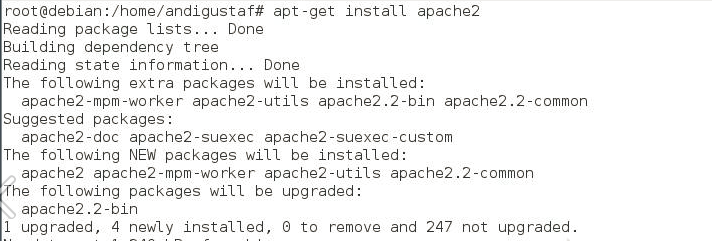
Hello world, previously we post the definition of web server and how it works. So here how to configure web server using apache. Install apache2 package Check using nmap Check the web server using a browser http://localhost . If it appears like this then it works Installing PHP5 Perform testing on php5 If it looks like the picture above then work and type http: //localhost/index.php. If the result looks like the picture below then it works Install mysql At the time of the installation process is told to go to the root is useful if we need to create a database. Test Mysql service using nmap

What is Web Server ?

Image
A Web server is a software that provides access services to users via HTTP or HTTPS communication protocols over files contained on a website, users use certain applications in the form of web browsers in making requests. The results of requests for web pages are generally in the form of HTML documents. The Web began in 1989, Tim Berners-Lee through CERN (European Organization for Nuclear Research) proposed a project aimed at facilitating the exchange of information among researchers using a hypertext system. As a result of the implementation of this project, in 1990 Berners-Lee wrote two computer programs: The world's first web server, which came to be known as CERN httpd, which runs on the NeXTSTEP operating system. A browser he named WorldWideWeb; In 1994, Tim Berners-Lee decided to standardize the World Wide Web Consortium (W3C) organization to organize advanced developments on other related technologies (HTTP, HTML, etc.) through the standardization process. ...

Tutorial Install FTP Server

Image
First install the proftpd app with the command "apt-get install proftpd", then hit enter. Then you will see 2 options for running applications proftpd in inetd or standalone mode. Inetd and standalone difference is when an ftp server accessed only occasionally or accessing a bit with the reasons for saving resources / memory. If an ftp server accessible continuously and many users accessing select standalone mode. After the installation is complete, check whether proftpd is running or not with the command "nmap localhost". If nmap has not been installed, install "apt-get install nmap" first. If port 21 exists, then the ftp server is already running. Then, test the ftp server from the client, use the command "ftp 10.252.108.44". Then enter the user name on the server, do not forget to enter the password as well. In this case i use user "student". Once logged in on the ftp server, type the command "ls" to fi...

DNS Slave Configuration

Image
The benefit of DNS Master is that one no longer needs to memorize the ip address to access a domain. The DNS Master will translate or translate ip addresses into a domain name and vice versa because DNS master is the one who holds the complete list of a domain it manages. While the benefits of DNS Slave is a backup of DNS Master. The DNS Slave is a backup DNS if our primary DNS occurs damage. There will be mutual transfer of information between the primary DNS and the DNS slave. The steps to build a Slave DNS are as follows: Set up a new DNS server, the old DNS server keeps running. For configuring the DNS Slave, we must first install DNS with the same steps as in DNS Server. We have to install bind9 first and then do the Slave DNS configuration. Edit and add configuration for forward and reverse on named.conf.local file. Finally, restart the daemon from bind9. The dns master should be rebooted after the dns slave finishes in settings.

Building two or more domains on a DNS Server

Image
Hello world. Previously I posted a post about installation and  configuration of DNS . Today I’d like to share you how to build  two or more domain in one server. Here we go. Firstly, Edit /etc/bind/named.conf.local file and  add virtual domain configuration. Create a file virtualdomain.conf in the directory that has been specified and fill in the domain name that will be created, eg domain admin.info and jarkom.info and so on. Create two domain files are copied from existing filedomain eg db.takehome.com. Next restart the dns server Perform testing by ping to a new domain.

Installation and configuration of DNS on Client and Server Side

Image
Hello guys, this time I’d like to share step by step DNS on server side and client side using linux ubuntu. If you still do not know what exactly DNS is, you can read our previous post in here . Then here you go. Server Side Log in as root on terminal Perform the installation package with the command After installing the package above configuration file will be created in /etc/bind then read the file named.conf, named.conf.local and named.conf.option. The following is the contents of the named.conf file, it is not necessarily a change to this file. Next there is the file named.conf.local, initially the contents of this file is still empty, fill with domain zones we will make and reverse domain as follows (in this case we will make domain takehome.com): The file named.conf.option contains additional options on our domain, add our main DNS here so that allows the client can connect to the internet: Next, prepare two files according to the conten...

What is Domain Name Server (DNS) ?

Image
What is Domain Name Server (DNS) ? The DNS server enters IP into the name of the address and vice versa from the name of the address to the IP number. Some ways to translate internet addresses include: Read local file / etc / hosts Utilizing DNS Server service The local / etc / hosts file contains a list of translation names to machine IP machine addresses that can be used also to translate IP addresses to names. By having this file, the Linux machine can use a more memorable name to call or access another machine on the network, instead of having to use an IP number. However this naming is only known locally on the computer in question. This file is very simple, its contents as in the following example: Explanation : Column 1 is an IP number Column 2 is FQDN (Fully Qualified Domain Name) Column 3 is the hostname The disadvantage of using the / etc / hosts file is : All machines or hosts in the network must have an identical file / etc / hosts Eve...