Posts

Image Processing : Image Enhancement & Grayscale Histogram - PART 2 -

Image
Go to previous part In the histogram there is the term histogram equalization. Histogram equalization aims to change the gray-level mapping to spread more evenly in the range of 0 to 255. For more details about the histogram equalization, note the image below. Figure 24. Example of dark dominant image. Figure 24 is an example of an image to be used in a histogram equalization experiment. Accidentally using the black dominant image because in the histogram equalization, the color values will be spread evenly. Note the histogram value in Figure 24 below. Figure 25. Results of histogram in Figure 24 Notice the histogram value in Figure 25. There is an uneven distribution of color and centered in the range of 0 to 50, or in other words concentrated in dark colors. Then how after getting equalization effect? Look at the image below. Gambar 26. Hasil equalization pada Gambar 24 In Figure 25, the image looks brighter than before. This is because the spread of color is ...

Image Processing : Image Enhancement & Grayscale Histogram - PART 1 -

Image
Image enhancement, or image quality improvement is one of the early processes in image processing. Improved image quality is required because often the image being made object have the quality not match as expected. The histogram in the grayscale image represents the distribution of the gray degree in an image. From this histogram can be seen whether the image is more dark color or more bright colors. Look at the picture below. Figure 1. An example of a grayscale image Figure 1 is actually a color image. But in this lab all colored images will be grayscale images. Figure 1 certainly has its own histogram value. Here is the histogram value of Figure 1. Figure 2. Histogram in Figure 1 Figure 2 is a histogram of Figure 1. If the value is seen in the graph, the value distribution is at most between the 30 to 99, so it has a dark dominant color. If you look again, the value above 149 is lower than the value below 149. It can be seen in Figure 1 is more dominant dark co...

C# Tutorial for Beginner : Chapter 10 Array 2-Dimension

Image
Introduction An array monitors various snippets of data in single line order, a one-dimensional record list. Notwithstanding, the information related with specific frameworks (an advanced picture, a tabletop game, and so forth.) lives in two measurements. To picture this information, we require a multi-dimensional information structure, that is, a multi-dimensional array. A two-dimensional array is extremely simply an array of arrays (a three-dimensional array is an array of arrays of arrays). The accompanying declaration makes a two-dimensional array of four lines and two segments. float[,] numbers = new float[3, 20]; Example Explanation  To make you more understand to this 2-dimension array, follow this example. Given a 2 dimensional array with size 6x6 as shown below. This array is illustrated with rows and columns. The first dimension is like a line and a second dimension is like a column Array 6 x 6 We focus on the position of the blue array Focusing Ar...

Quantization of Image Data Implementation in C#

Image
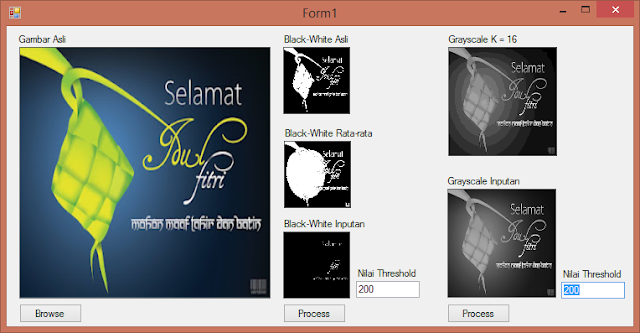
Introduction  This time we will share how to create an application to change the threshold value from black-and-white to the average value of the gray degree of all points and add textBox so that the user can change the threshold value according to the user's wishes. Besides that we also will add textBox to input quantization value. So the user can change the quantization as desired. Application Screenshoot A black-and-white image is an image that contains only black or white. Black is valued 0 and white is valued 255. To make the picture in black and white, the original color will be gray degree and each pixel will be compared with its threshold value. Normally, the black-and-white degree image has a 128 threshold value, so if the color value is less than 128, then the color is changed to 0 (black), and which is greater than or equal to 128 will be converted to 255 (white). Consider the example image below. Figure 1. The original image is predominantly dark When vi...